

Know exactly how your SmartRecruiters instances differ.
Migrado compares two SmartRecruiters instances, highlights every configuration difference with AI, and lets your team sign off each one. All read-only, and running on your own SAP BTP.
The problem
Differences slip through to go-live.
Checked by hand
Differences between SmartRecruiters instances (Dev, Test, Production) are checked screen by screen, and they are easy to miss.
Found by candidates first
A missing template, a changed approval chain, a field that behaves differently: candidates and hiring managers find the gaps before you do.
No record of decisions
Release leads have no clear record of which differences were intended and which were not.
Migration multiplies the risk
Moving from SAP SuccessFactors Recruiting to SmartRecruiters means rebuilding the configuration, then checking it.
What Migrado does today
A review sheet, not a data dump.
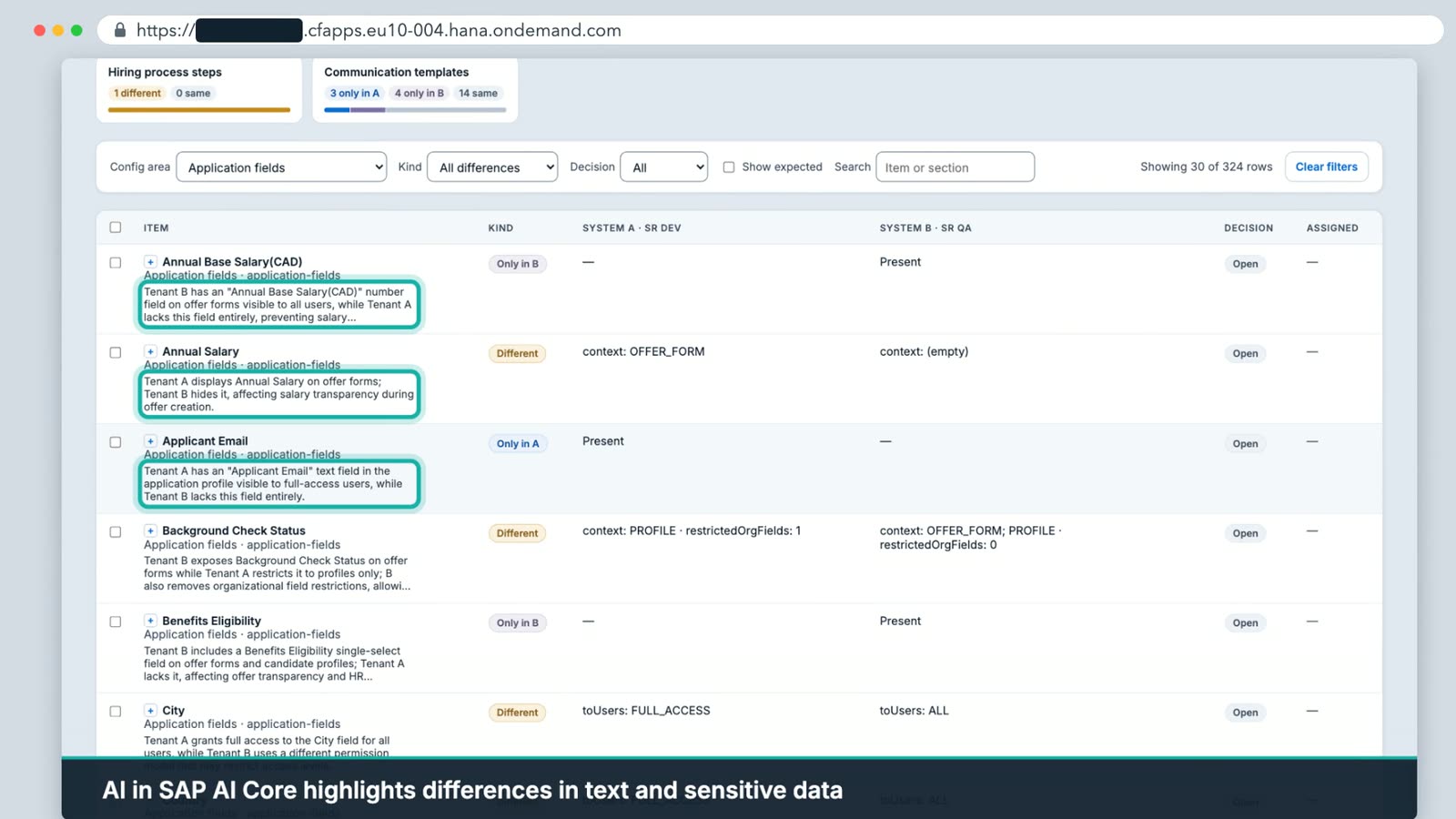
- Compare any two instances. Pick System A and System B, choose the configuration areas, start. A full comparison takes a few minutes.
- 14 configuration areas. Templates, hiring process, approvals, fields, question library, roles and more.
- Clear labels. Every item is only in A, only in B, different or the same, with the exact fields that changed, side by side.
- AI that highlights differences. Through SAP AI Core on your SAP BTP, AI explains what changed in the text and the sensitive details, and why it matters, in one plain sentence.
- Sign-off built in. Mark each difference Expected or Raise it with an assignee. Expected differences stay hidden next time, so you only review what is new.
- Export to Excel. One tab per configuration area, for reviewers who prefer a spreadsheet.
Coverage
The 14 configuration areas.
Templates and communication
- Communication templates
- Auto reply
- Automated communication
- Custom consent request
- Offer templates
- Job ad footer
Process and approvals
- Hiring process steps
- Job approvals
- Rejection and withdrawal reasons
Fields and questions
- Job fields
- Application fields
- Question library
Roles and permissions
- System roles
- Hiring team roles
How it works
Connect, compare, review, decide.
- 01
Connect
Add two SmartRecruiters systems once, with their environment and access details. Sensitive details stay hidden.
- 02
Compare
Choose the configuration areas and start. Migrado reads both systems and never writes to either.
- 03
Review
See only in A, only in B, different and the same, with an AI highlight beside each difference.
- 04
Decide and export
Mark Expected or Raise, and export the worksheet to Excel if you want it offline.
Safe by design
Your live systems are never touched.
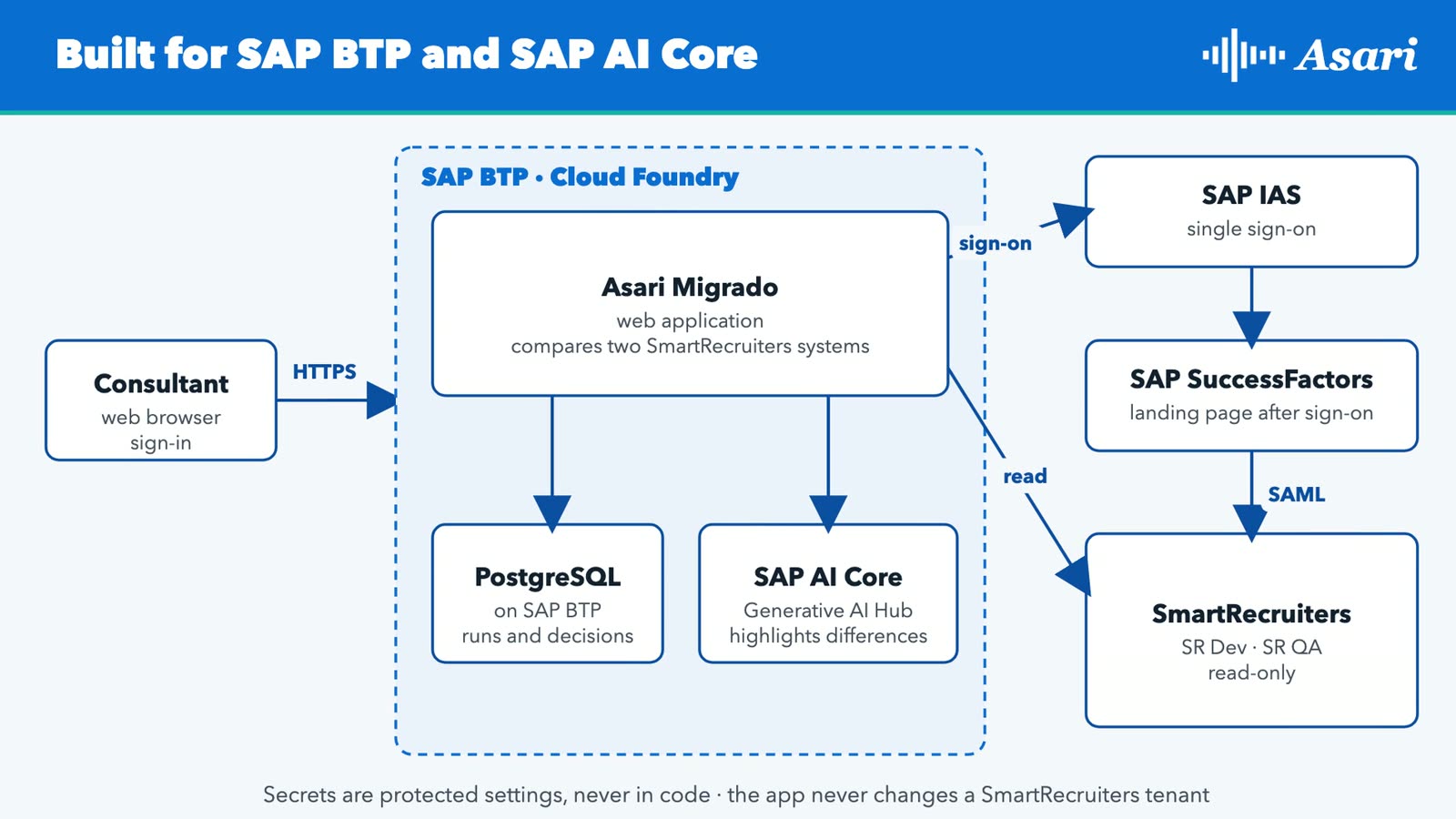
- Read-only. Migrado never changes your SmartRecruiters systems.
- Runs on your SAP BTP. One deployment per customer, in your own landscape.
- Your SAP sign-on. Your team signs in through SAP Identity Authentication (SAP IAS), and Migrado reads SmartRecruiters through your SAP single sign-on.
- AI highlights, people decide. AI explains each difference. Your team marks it Expected or Raise.
Who it is for
Fewer go-live surprises, less manual checking, a clear record of every decision.
Talent acquisition leaders
The same hiring process and candidate messages everywhere. Go live knowing exactly what changed.
HRIS and system admins
A full comparison in minutes instead of manual checks, with a plain-language highlight for each difference.
Project and release leads
Clear sign-off. Each difference is Expected or Raised, and decisions carry forward to the next release.
IT and security
Runs on your own SAP BTP with SAP IAS sign-on. Read-only, so live systems are never touched.
Roadmap
Compare today. Migrate next.
Dates are targets and may change.
Compare
- Instance comparison across 14 areas
- Review sheet with Expected or Raise
- Excel export
- AI highlights with SAP AI Core
- Runs on your SAP BTP with SAP IAS sign-on
Broader coverage
- More areas: interview templates, locations, career sites, departments, access groups
- Deeper hiring process, approval and question detail
- First SuccessFactors Recruiting to SmartRecruiters migration for text-based areas
Complete product
- Full SuccessFactors Recruiting to SmartRecruiters migration
- Approve every item before anything is written
- PDF export for sign-off
- "What changed since last time" view
Questions
Frequently asked questions.
Does it change my SmartRecruiters systems?
No. Migrado is read-only. Nothing is written to either instance.
Where does it run?
On your own SAP BTP, as one deployment per customer.
What does the AI do?
Through SAP AI Core, AI works on the text and the data-sensitive details of each difference and highlights what changed and why it matters, in plain words. It does not make decisions: your team marks each difference Expected or Raise.
How long does a comparison take?
A full 14-area comparison takes a few minutes. Smaller ones, for a single area, take under a minute.
Can I share the results with people who don't use the tool?
Yes. Export the worksheet to Excel: one tab per configuration area.
Do I have to review the same differences every time?
No. Differences marked Expected are hidden in the next comparison of the same two systems, so you only review what is new.
Can it migrate SuccessFactors Recruiting to SmartRecruiters?
That is the next phase. A first release for the text-based areas is targeted for the end of October 2026, and the full migration for Q1 2027.
Catch SmartRecruiters differences before your candidates do.
We would be glad to show Migrado on your Dev and Test instances. Our team holds 15 SmartRecruiters for SAP SuccessFactors certifications (SAP partner records, October 2026).
SAP, SAP BTP, SAP AI Core, SAP SuccessFactors and SmartRecruiters are trademarks or registered trademarks of SAP SE or its affiliates. Asari Migrado is built by Asari Technologies and is not an SAP product.